
我们刚刚发布了 Studio — 这是我们过去几个月为 Tailwind UI 开发的一个漂亮的新机构网站模板。
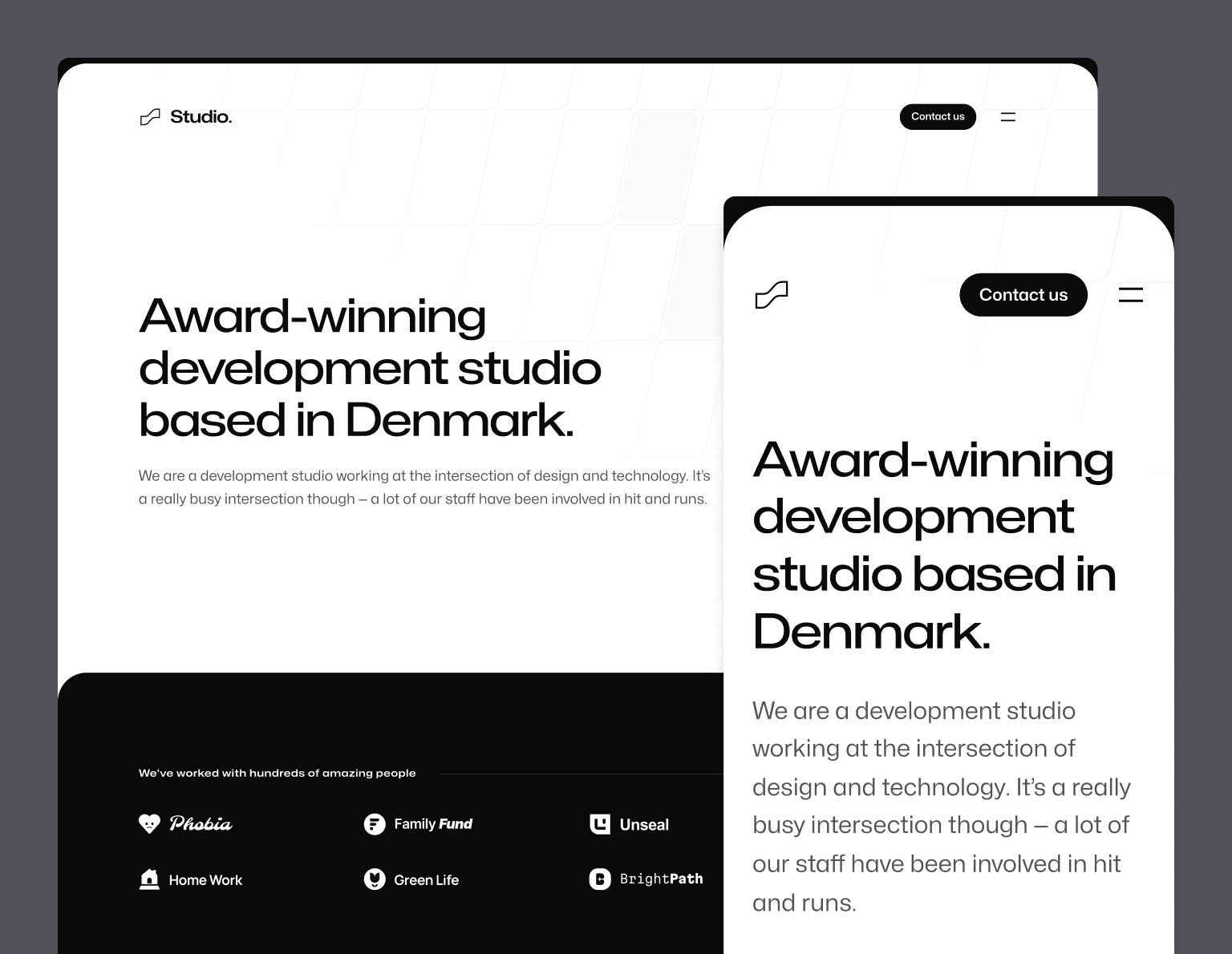
我们使用 Next.js、MDX 和当然还有 Tailwind CSS 构建了它,这是我们使用新的 Next.js App Router 发布的第一个模板。
设计一个机构模板是一个有趣的项目,因为创意机构通常会使用自己的网站来展示一些非常炫目的、定制的创意,而当目标是展示你自己公司的能力时,使用模板就显得有点奇怪。
所以我们尝试带着两个目标去做这件事,以使它真正对人们有用:
-
教人们如何做一些在炫目的机构网站上看到的酷炫效果 — 我始终认为我们的模板不仅仅是作为模板有价值(如果不是更有价值的话),所以我们想把这个模板作为一个机会,展示我们如何构建在这类网站上看到的许多酷炫的交互和动画细节。
-
为不出售设计服务的机构设计它 — 有很多机构只专注于工程工作,而这些公司在设计方面往往很难脱颖而出。我们试图以一种不依赖大量设计作品截图之类的方式来设计这个模板,让一个专注于代码的机构也可以把它作为自己网站的起点。
我认为我们的成果很好地达到了这两个目标,我对最终结果感到非常自豪。
像往常一样,查看在线预览以获得完整体验 — 这个模板有很多酷炫的细节,你必须在浏览器中亲自体验才能真正欣赏到。
我们试图按照我们自己构建网站的方式来构建这个网站,所以它包括一个专门的博客、一个用于列出你最喜欢的项目的页面、一个用于链接你的会议演讲之类内容的区域,以及一个使用页面用于列出你所有喜爱的工具和装备。
如果你有 Tailwind UI 全访问许可证,那么你已经可以使用这个模板了!如果没有,请考虑入手 — 这是支持我们开源项目(如 Tailwind CSS、Headless UI 和 Heroicons)工作的最好方式。
动画效果出众
机构网站的一个不成文规则就是要炫目。我们没有走极端到替换鼠标光标或用 WebGL 渲染整个网站,而是寻找机会在恰当的地方优雅地加入动画和交互效果。
例如,我们基于 Framer Motion 的一些功能构建了一个轻量的声明式组件 API,使滚动触发的入场动画变得容易实现:
这类动画的开发体验非常好 — 只需用 FadeIn 或 FadeInStagger 组件包装你想要淡入的内容即可:
function Clients() { return ( <div className="mt-24 rounded-4xl bg-neutral-950 py-20 sm:mt-32 sm:py-32 lg:mt-56"> <Container> <FadeIn className="flex items-center gap-x-8"> <h2 className="font-display text-center text-sm font-semibold tracking-wider text-white sm:text-left"> We’ve worked with hundreds of amazing people </h2> <div className="h-px flex-auto bg-neutral-800" /> </FadeIn> <FadeInStagger faster> <ul role="list" className="mt-10 grid grid-cols-2 gap-x-8 gap-y-10 lg:grid-cols-4"> {clients.map(([client, logo]) => ( <li key={client}> <FadeIn> <Image src={logo} alt={client} unoptimized /> </FadeIn> </li> ))} </ul> </FadeInStagger> </Container> </div> );}我们还为标志添加了一个小动画,在悬停时标志会填充为纯色:
这个小细节看起来很小,但有趣的是,如果没有客户端导航,你实际上无法实现它,因为点击标志返回主页时动画会重新运行。使用像 Next.js 这样的框架,我们能够在悬停时保持标志填充,即使在 URL 更改时也是如此,这感觉好多了。
菜单抽屉动画也非常好,在打开时将整个页面向下推:
如果你仔细观察,标志和按钮不仅仅是简单地改变颜色 — 它实际上是由滑动下来的页面的位置精确驱动的,当页面的边缘与标志相交时,标志实际上是部分白色和部分黑色的。
我非常喜欢的另一个细节是我们为案例研究页面上的图像设计的这种交互:
我们希望整个网站感觉是黑白的,但一直显示黑白图像感觉不对。所以我们想出了这种处理方式,图像开始时是黑白的,当图像在滚动时接近屏幕中心时,饱和度会动画回到彩色。我们还在悬停时显示全彩色图像。
我们还小心地尝试以一种考虑到有前庭运动障碍的人并对这些类型的大动画敏感的方式实现所有这些动画。使用 Framer Motion 的 useReducedMotion 钩子和 Tailwind 的 motion-safe 变体,我们会有条件地禁用导航菜单动画,并将滚动驱动的入场动画限制为仅不透明度,以便屏幕上的内容不会移动。
以开发者为中心的案例研究和博客工作流程
Studio 支持 案例研究 和 博客文章,正如你可能猜到的,如果你玩过我们的其他模板,我们借此机会将 MDX 集成到项目中。
以下是一个基本案例研究的示例 — 主要用 markdown 编写,带有一些常见的元数据和对内容中自定义组件的支持:
import logo from "@/images/clients/phobia/logomark-dark.svg";import imageHero from "./hero.jpg";import imageJennyWilson from "./jenny-wilson.jpeg";export const caseStudy = { client: "Phobia", title: "Overcome your fears, find your match", description: "Find love in the face of fear — Phobia is a dating app that matches users based on their mutual phobias so they can be scared together.", summary: [ "Find love in the face of fear — Phobia is a dating app that matches users based on their mutual phobias so they can be scared together.", "We worked with Phobia to develop a new onboarding flow. A user is shown pictures of common phobias and we use the microphone to detect which ones make them scream, feeding the results into the matching algorithm.", ], logo, image: { src: imageHero }, date: "2022-06", service: "App development", testimonial: { author: { name: "Jenny Wilson", role: "CPO of Phobia" }, content: "The team at Studio went above and beyond with our onboarding, even finding a way to access the user’s microphone without triggering one of those annoying permission dialogs.", },};export const metadata = { title: `${caseStudy.client} Case Study`, description: caseStudy.description,};## OverviewNoticing incredibly high churn, the team at Phobia came to the conclusion that, instead of having afundamentally flawed business idea, they needed to improve their onboarding process.Previously users selected their phobias manually but this led to some users selecting things theyweren’t actually afraid of to increase their matches.To combat this, we developed a system that displays a slideshow of common phobias duringonboarding. We then use malware to surreptitiously access their microphone and detect when theyhave audible reactions. We measure the pitch, volume and duration of their screams and feed thatinformation to the matching algorithm.The next phase is a VR version of the onboarding flow where users are subjected to a series ofscenarios that will determine their fears. We are currently developing the first scenario, workingtitle: “Jumping out of a plane full of spiders”.## What we did<TagList> <TagListItem>Android</TagListItem> <TagListItem>iOS</TagListItem> <TagListItem>Malware</TagListItem> <TagListItem>VR</TagListItem></TagList><Blockquote author={{ name: "Jenny Wilson", role: "CPO of Phobia" }} image={{ src: imageJennyWilson }}> The team at Studio went above and beyond with our onboarding, even finding a way to access the user’s microphone without triggering one of those annoying permission dialogs.</Blockquote><StatList> <StatListItem value="20%" label="Churn rate" /> <StatListItem value="5x" label="Uninstalls" /> <StatListItem value="2.3" label="App store rating" /> <StatListItem value="8" label="Pending lawsuits" /></StatList>所有这些模板的排版样式都是完全自定义的,这次我们采取了一种不同的方法 — 我们没有编写大量复杂的 CSS 来避免排版样式与 MDX 中的任何自定义组件冲突,而是创建了一个名为 remark-rehype-wrap 的小型 remark 插件,使得可以用包装元素包裹 Markdown 内容块。
这样,我们可以用 typography 类包裹任何普通的 Markdown 内容,但确保文档中的任何自定义组件都不会被包裹,而不是尝试编写 CSS 以忽略树的这些部分。
这两种方法都完全可行,但尝试新想法并看看你学到了什么总是很有趣。我也很好奇基于即将推出的 CSS 新功能 style queries 的解决方案在未来会是什么样子!
所以这就是 Studio! 下载它,拆解它,看看你是否能学到一些新技巧。
像我们所有的模板一样,它包含在一次性购买的 Tailwind UI 全访问 许可证中,这是支持我们在 Tailwind CSS 上的工作的最好方式,使我们能够在未来几年继续构建出色的东西。